



I don’t like monthly payments. Five dollars here, seven dollars there, it all adds up. One of those charges was on my monthly cellphone bill: $7 for visual voicemail.
“Basic voicemail” is included with my phone plan, but nobody really wants to dial into a voicemail system, enter a password and listen to messages like it’s 1998. So Apple invented visual voicemail: you can see your voicemail messages on screen, without the need to dial any number. Much better. I just wasn’t convinced it should cost an additional $84 a year.
Then, more recently, I discovered that my iPhone could do most of this by itself using “Live Voicemail”. And somehow nobody really explicitly told me I don’t need to pay anyone for voicemail anymore. So let me share it with you.1
Traditional Voicemail Versus Visual Voicemail
Traditional voicemail is controlled by the cellphone provider. When I don’t answer, the network forwards the call to the provider’s voicemail system. The message is stored there, and I call that system to listen to it.
Visual voicemail improves the interface, but the provider still controls the underlying service. The messages appear inside the iPhone’s Phone app, yet the voicemail system remains part of the carrier network. That gives the provider an opportunity to package it as a premium add-on.
Apple’s Live Voicemail works differently. When enabled and my phone is connected to the network, my iPhone answers the call itself. It records the message, shows me a live transcription and gives me the option to answer while the caller is still speaking. This all happens entirely on my device.
At first, I assumed “Live Voicemail” was simply a new interface connected to my provider’s existing voicemail system. The name certainly sounds that way.
Once I understood that the phone was handling it locally, the equation changed. I no longer needed to pay my provider for visual voicemail, and I didn’t need its traditional voicemail as a backup either. So I called them and asked them to disable all voicemail services on my account.
How to Replace Carrier Voicemail With Live Voicemail
Start by enabling Live Voicemail before making any changes to your cellphone account.
On your iPhone, go to: Settings → Apps → Phone and scroll down to the Live Voicemail toggle:

Turn it on, then call your number from another phone. Don’t answer. Leave a message and confirm that the transcription and recording appear in the Phone app. If you see the transcription, this call is handled directly on your device.
Once you know Live Voicemail is working, contact your cellphone provider and ask them to disable carrier voicemail completely. You have to be specific with them: removing the paid visual voicemail add-on may simply leave you with traditional voicemail, which means unanswered calls will still be forwarded to the provider’s system. I wanted the entire carrier voicemail service turned off and handle everything locally on my device.
This took me several phone calls. Apparently, completely disabling voicemail is not a request that fits neatly into every customer-service script. Keep checking until a test call confirms that the provider’s mailbox is gone. You may wish to temporarily turn off live voicemail again to confirm the unanswered call doesn’t go anywhere on the network.
Afterward, unanswered calls should be handled by Live Voicemail while the iPhone is on and connected.
The Catch
Live Voicemail only works when the iPhone is turned on and within the carrier network’s range. When the phone is off or unavailable, the network sends the call to carrier voicemail if carrier voicemail exists. Because I disabled my network voicemail service, callers cannot leave me a message when my phone is off or unavailable.
For me, that’s fine, but this may be a problem for someone who needs to receive urgent messages at all times. Test the behaviour before cancelling anything and decide whether you want or need the carrier backup.
For me, it’s more of a feature. When my phone is turned off or disconnected, I’m comfortable being unavailable. People can call again or, better yet, send me a text.
Add Call Screening While You’re There
The other iPhone setting that has made a noticeable difference is Call Screening.
Go to: Settings → Apps → Phone and scroll down to Screen Unknown Callers, and select Ask Reason for Calling:
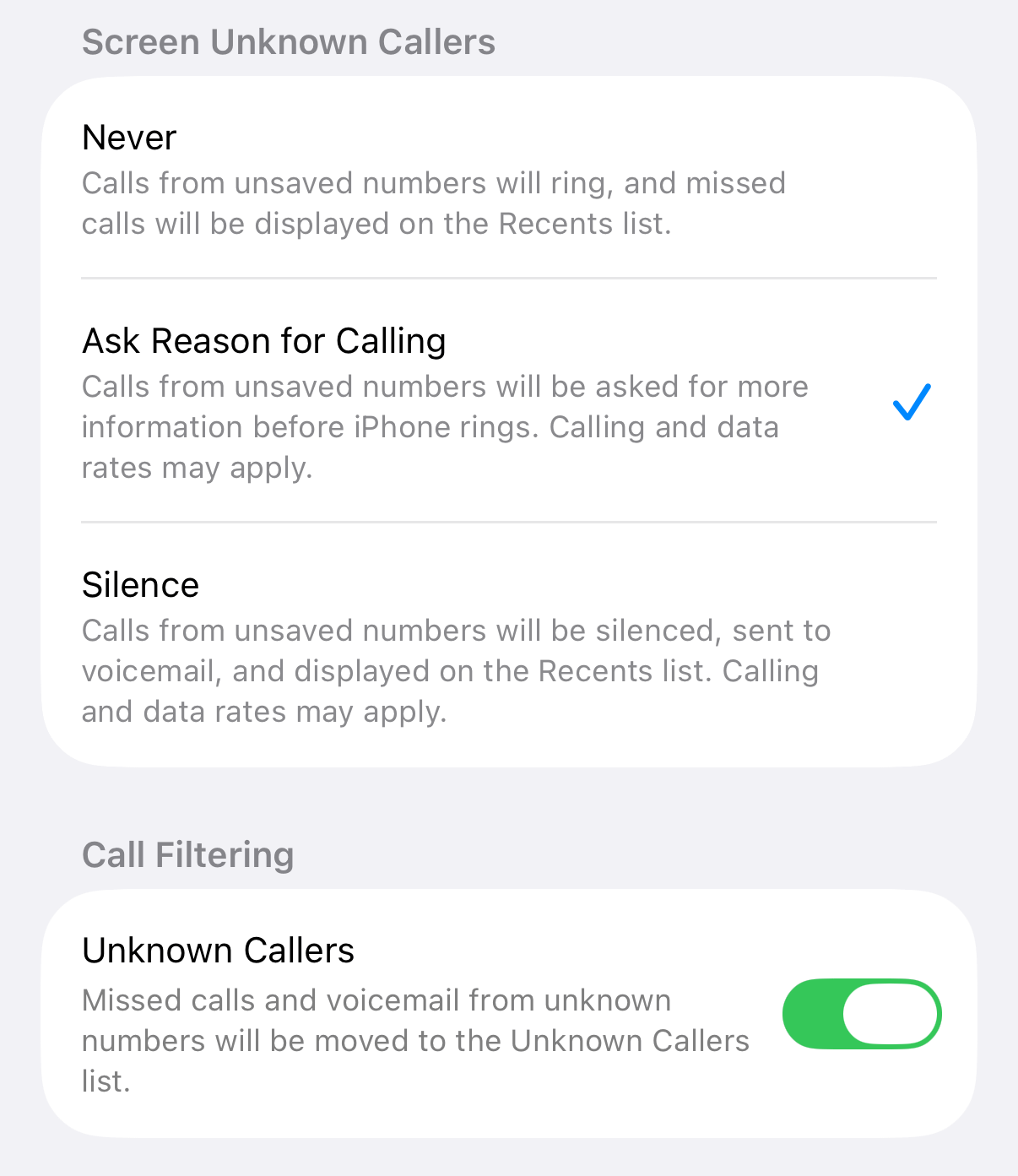
When you receive a call from a number not in your contacts, the iPhone answers without ringing and asks the caller for their name and the reason for the call. I see the response transcribed on screen and can decide whether to pick up. Calls from people who are in my contact list ring normally. Everyone else can briefly explain what they want before interrupting me.
Since enabling it, almost all my spam calls have disappeared. Most spammers don’t bother responding to a screening prompt, and the two that did (in the last year or so) could be easily ignored.
The calls still reach my phone, but automated diallers and scammers don’t like explaining themselves to Siri before being connected. Most legitimate callers have no problem providing a name and reason.
Thanks, Siri.
Cellphone Providers Must Do Better
Call screening can also be done at the network level. TELUS, for example, offers a Call Control feature that screens callers before connecting them. The CRTC has encouraged Canadian providers to offer advanced call-filtering services and has required network blocking for certain types of invalid calls. The technology exists, but the protection networks provide is simply non-existent.
Privacy rules are often used as an excuse providers cannot inspect, identify or block more suspicious calls. Privacy matters, but it can’t be a permanent excuse for doing the bare minimum while customers continue to be bombarded with spoofed numbers and fraudulent calls.
The consequences go beyond irritation. Telephone scams deliberately target people who may be more trusting or less familiar with how convincing modern spoofed calls can be. Older adults fall victim to fraud more often than other age groups, with phone calls remaining a common method.
Providers control the networks carrying these calls. They may not be able to stop every scam originating somewhere outside Canada, but they can add more friction, provide better screening and make effective protection available consistently. They don’t. Meanwhile my iPhone eliminated almost all the problem with one setting.
Get Into Action
All the steps are included above - give this a try for yourself and see if it works for you. If you can, please share this article so more people can save $7 a month, or, more importantly, filter annoying scam calls so your family, friends and loved ones don’t need to be the next victim of some scam operator.
Further reading


Apple introduced Live Voicemail with iOS 17 in September 2023. Availability may vary by country, language and region.